# Heureka integration

# ![Screenshot_2020-04-29_at_19.12.41.png](https://knowledge.tauceti-digital.com/uploads/images/gallery/2024-11/JWPscreenshot-2020-04-29-at-19-12-41-png.png) Getting started

In this article, you can find information about the Heureka integration. This integration prepares a product feed that can be used on the Heureka platform. The feed is available under   
**/partner/feedHeureka.xml** (i.e. [http://www.yves-rocher.cz/partner/feedHeureka.xml](http://www.yves-rocher.cz/partner/feedHeureka.xml)) when it is enabled in the system settings. The feed is generated every two hours.

<span class="wysiwyg-color-black" style="color: #44549b;">![info2.svg](https://knowledge.tauceti-digital.com/uploads/images/gallery/2024-11/IcGinfo2-svg.png) **Remember**</span><span class="wysiwyg-color-black" style="display: block; margin-top: 10px;">Heureka is a Czech e-commerce site. More than 38,000 online stores present their offers on the Heureka.cz platform, allowing portal users to choose offers and compare prices of more than 21 million products.</span>

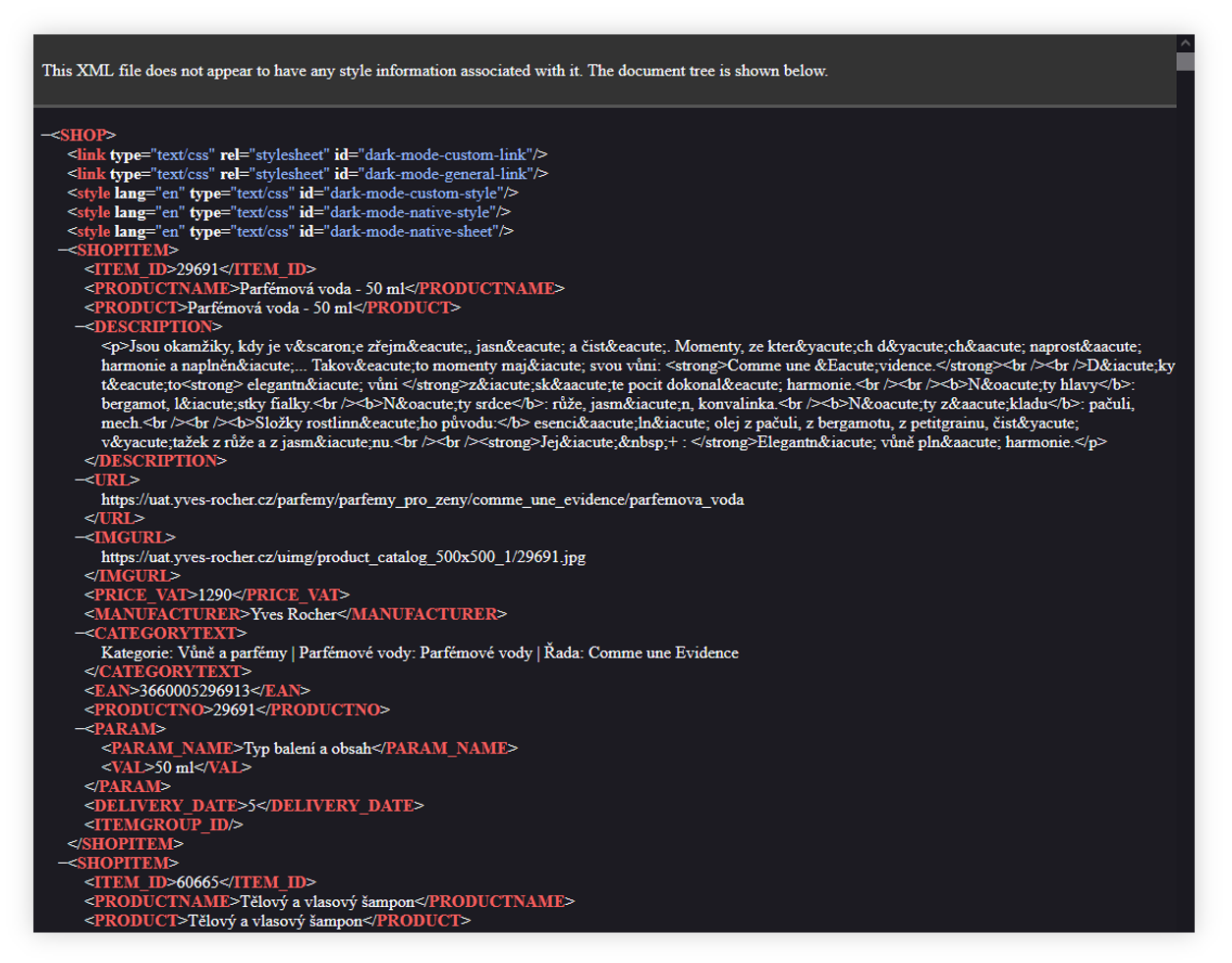
<table id="bkmrk-visualization-of-the" style="margin-right: auto; margin-left: auto; height: 44px; width: auto;"><tbody><tr style="height: 22px;"><td class="wysiwyg-text-align-center" style="text-align: center; vertical-align: middle; height: 22px; width: auto;">![POWERPNT_47hRkE4LkA.png](https://knowledge.tauceti-digital.com/uploads/images/gallery/2024-11/8017778810012.png)</td></tr><tr style="height: 22px;"><td class="wysiwyg-text-align-center" style="text-align: center; vertical-align: middle; height: 22px; width: auto;"><span class="wysiwyg-font-size-medium">*Visualization of the Heureka xml feed* </span></td></tr></tbody></table>

Table of contents:

1. [ Configuration of the integration](#bkmrk-configuration-of-the-1)
2. [ Feed overview](#bkmrk-feed-overview)

---

# ![Screenshot_2020-04-29_at_19.12.41.png](https://knowledge.tauceti-digital.com/uploads/images/gallery/2024-11/JWPscreenshot-2020-04-29-at-19-12-41-png.png) Configuration of the integration

In order for a feed to be available it needs to be enabled. You can find the feed configuration in the

***System &gt; System / Settings &gt; Integrations &gt; Heureka***.

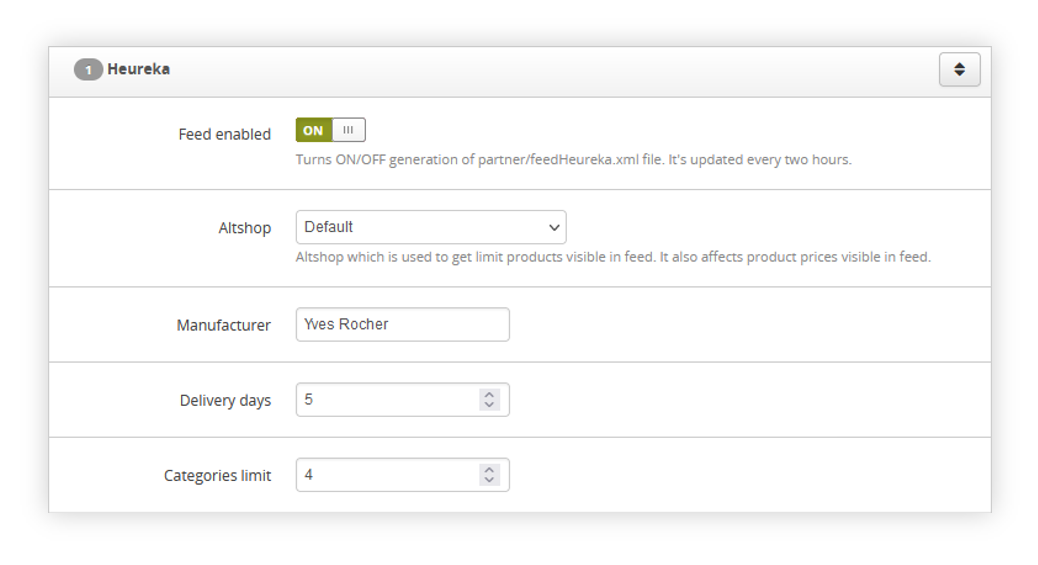
<table id="bkmrk-visualization-of-the-1" style="margin-right: auto; margin-left: auto; height: 44px; width: auto;"><tbody><tr style="height: 22px;"><td class="wysiwyg-text-align-center" style="text-align: center; vertical-align: middle; height: 22px; width: auto;">![POWERPNT_vetfnAf7WP.png](https://knowledge.tauceti-digital.com/uploads/images/gallery/2024-11/8017778805532.png)</td></tr><tr style="height: 22px;"><td class="wysiwyg-text-align-center" style="text-align: center; vertical-align: middle; height: 22px; width: auto;"><span class="wysiwyg-font-size-medium">*Visualization of the Heureka integration in the System settings.* </span></td></tr></tbody></table>

In the Heureka tab in the system settings you can find the following options:

- **Feed enabled** - A switch that decides whether the feed should be generated or not. Disabling the feed does not delete the file that has already been generated.
- **Altshop** - A list of altshops you can choose a single altshop from which products should be downloaded and applied to the feed.
- **Manufacturer** - The name of the manufacturer, appearing in the **MANUFACTURER** field in the generated feed.
- **Delivery days** - information after what time the product will be delivered. This is the **DELIVERY\_DATE** field in the feed.
- **Categories limit** - the limit of categories displayed in the feed for one product (analogous to the limit on the product card).

---

# ![Screenshot_2020-04-29_at_19.12.41.png](https://knowledge.tauceti-digital.com/uploads/images/gallery/2024-11/JWPscreenshot-2020-04-29-at-19-12-41-png.png) Feed overview

In the Heureka feed, we can find available products from the selected altshop.

<table id="bkmrk-visualization-of-the-2" style="margin-right: auto; margin-left: auto; height: 44px; width: auto;"><tbody><tr style="height: 22px;"><td class="wysiwyg-text-align-center" style="text-align: center; vertical-align: middle; height: 22px; width: auto;">![POWERPNT_47hRkE4LkA.png](https://knowledge.tauceti-digital.com/uploads/images/gallery/2024-11/8017778810012.png)</td></tr><tr style="height: 22px;"><td class="wysiwyg-text-align-center" style="text-align: center; vertical-align: middle; height: 22px; width: auto;"><span class="wysiwyg-font-size-medium">*Visualization of the Heureka xml feed* </span></td></tr></tbody></table>

Every product in the feed has the following fields:

- **ITEM\_ID** - Product SKU number taken from the **SKU** field
- **PRODUCTNAME** - Product name taken from a **name** field
- **DESCRIPTION** - Product description taken from the **Main description** field
- **URL** - Product URL starting with the website URL (i.e. [https://www.yves-rocher.cz](https://www.yves-rocher.cz)) and followed by the URL taken from the **Friendly URL** field.
- **IMGURL** - URL of the image assigned to the selected product.
- **PRICE\_VAT** - Current price of the product
- **MANUFACTURER** - Manufacturer name set in the [Heureka configuration](#bkmrk-configuration-of-the-1).
- **CATEGORYTEXT** - Product properties and tag. Properties are separated by a vertical bar.
- **EAN** - Product EAN number taken from the **EAN** field.
- **PRODUCTNO** - Product SKU number taken from the **SKU** field
- **PARAM** - List of parameters.  
    
    - **PARAM\_NAME** - Name of the parameter.
    - **VAL** - Value of the parameter.
- **DELIVERY\_DATE** - Delivery date value set in the [Heureka configuration](#bkmrk-configuration-of-the-1).
- **ITEMGROUP\_ID** - SKU of a parent product (applicable for example for color variations)