# Omnibus price history

# ![Screenshot_2020-04-29_at_19.12.41.png](https://knowledge.tauceti-digital.com/uploads/images/gallery/2024-11/AaCscreenshot-2020-04-29-at-19-12-41-png.png) Getting started

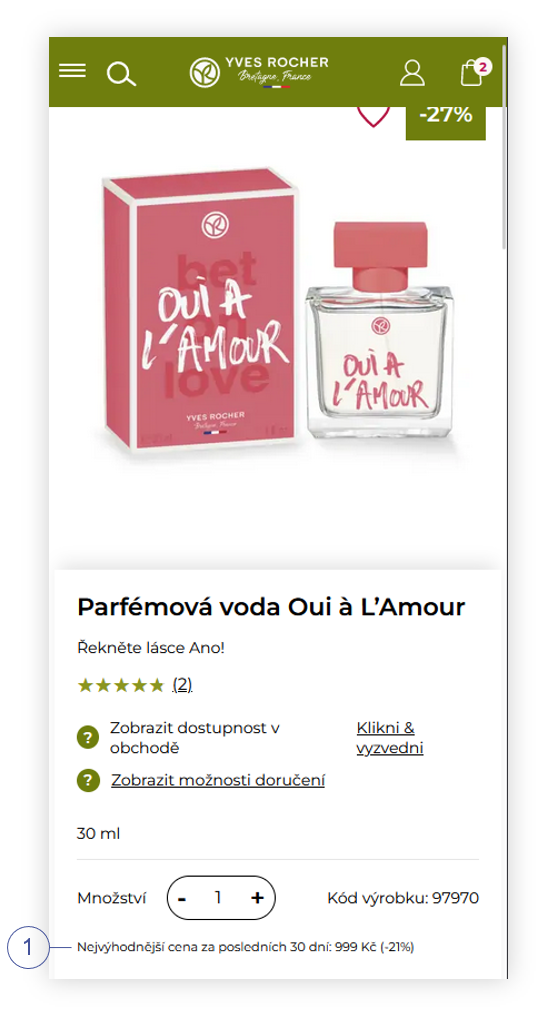
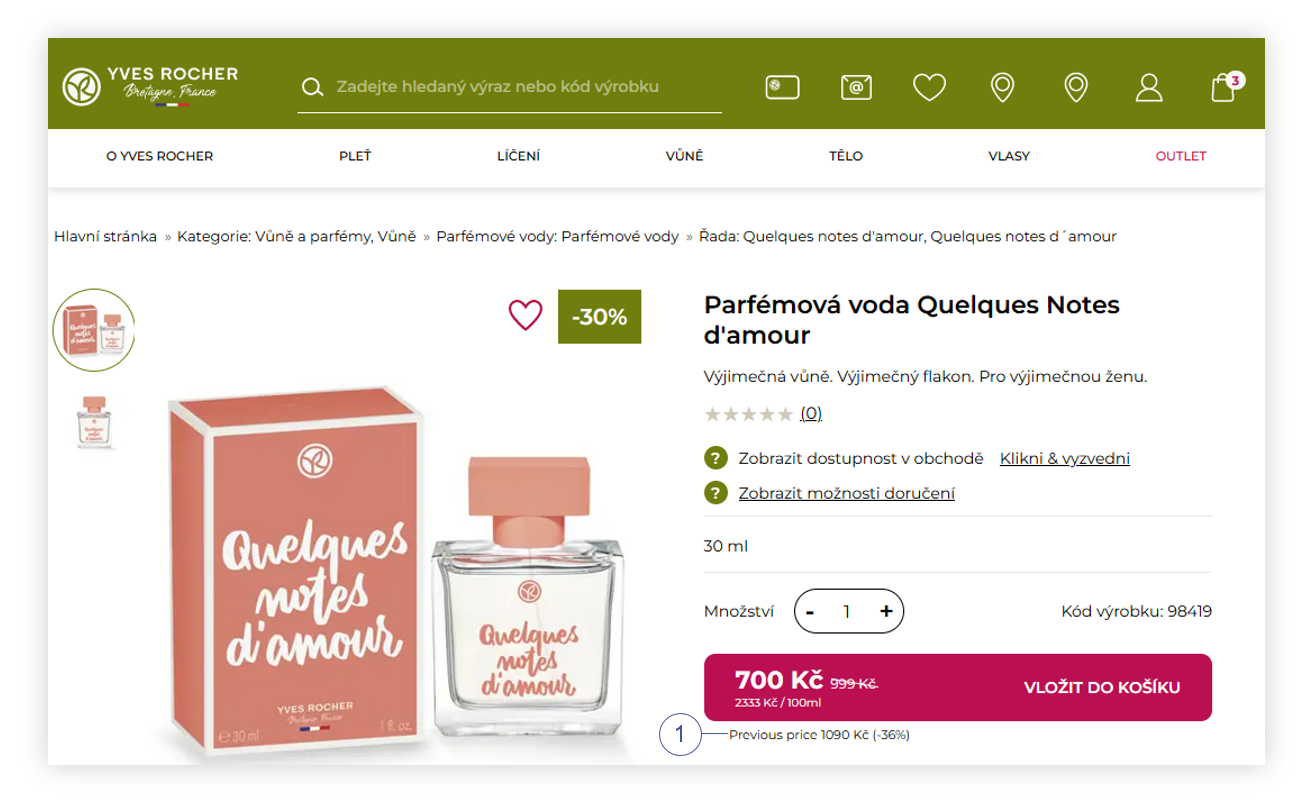
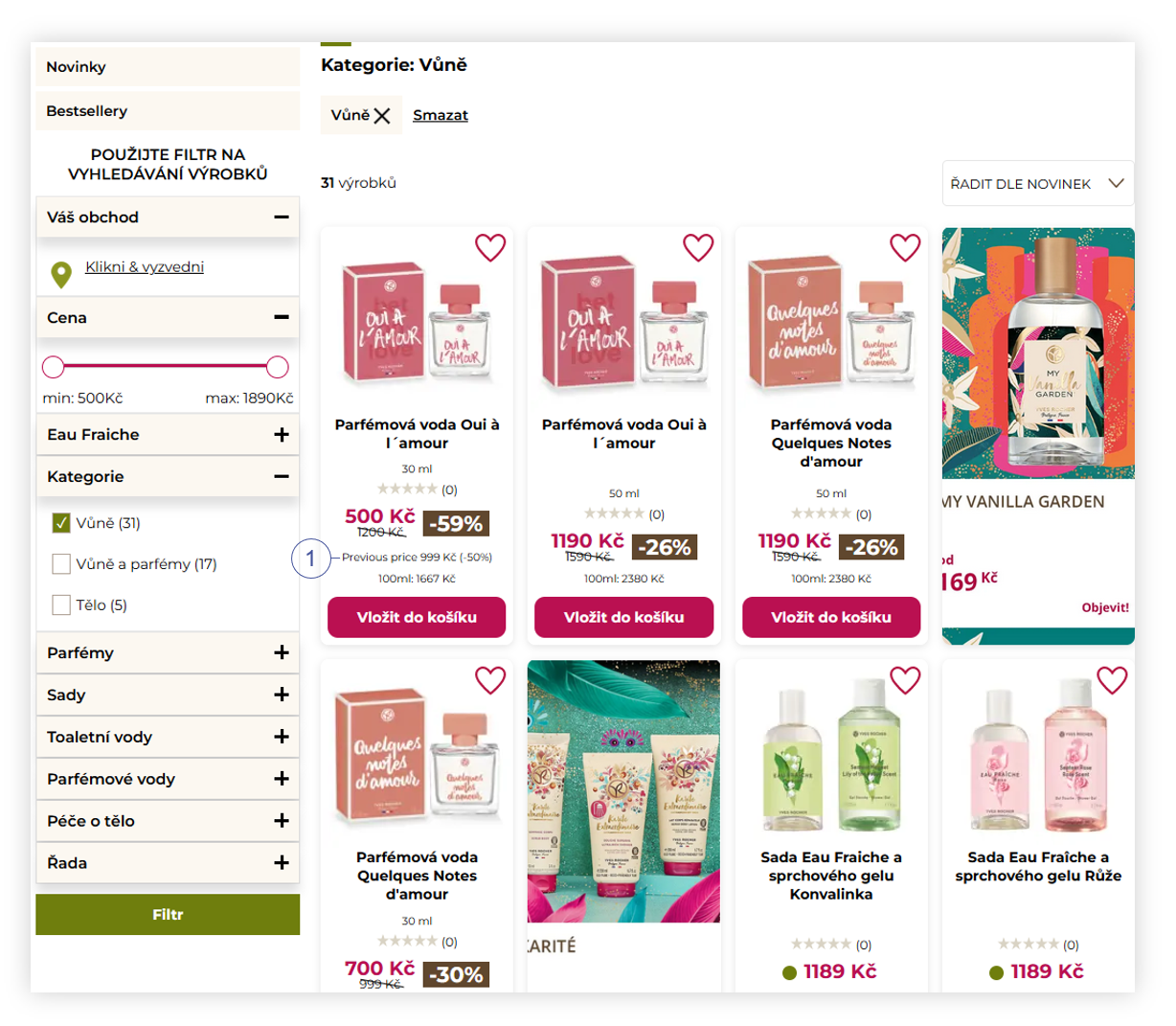
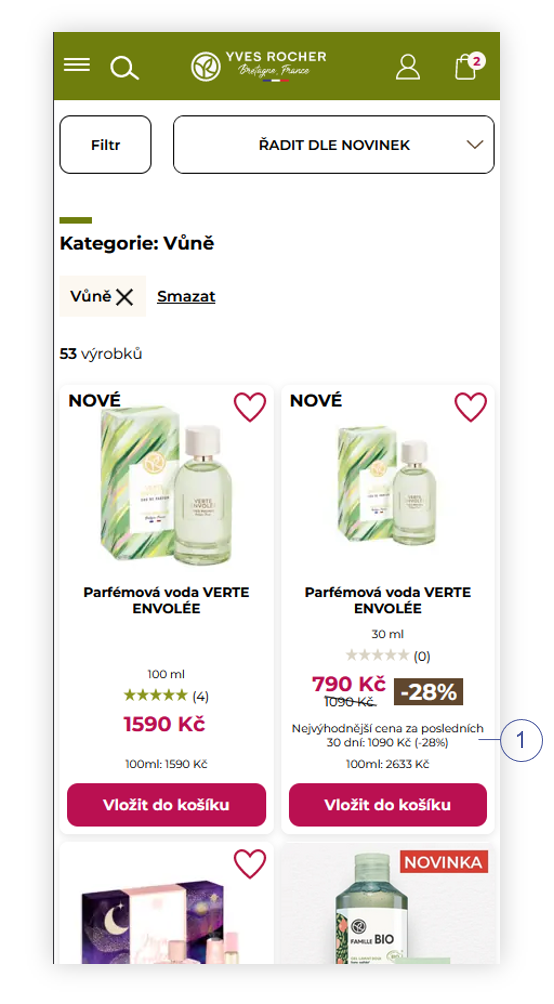
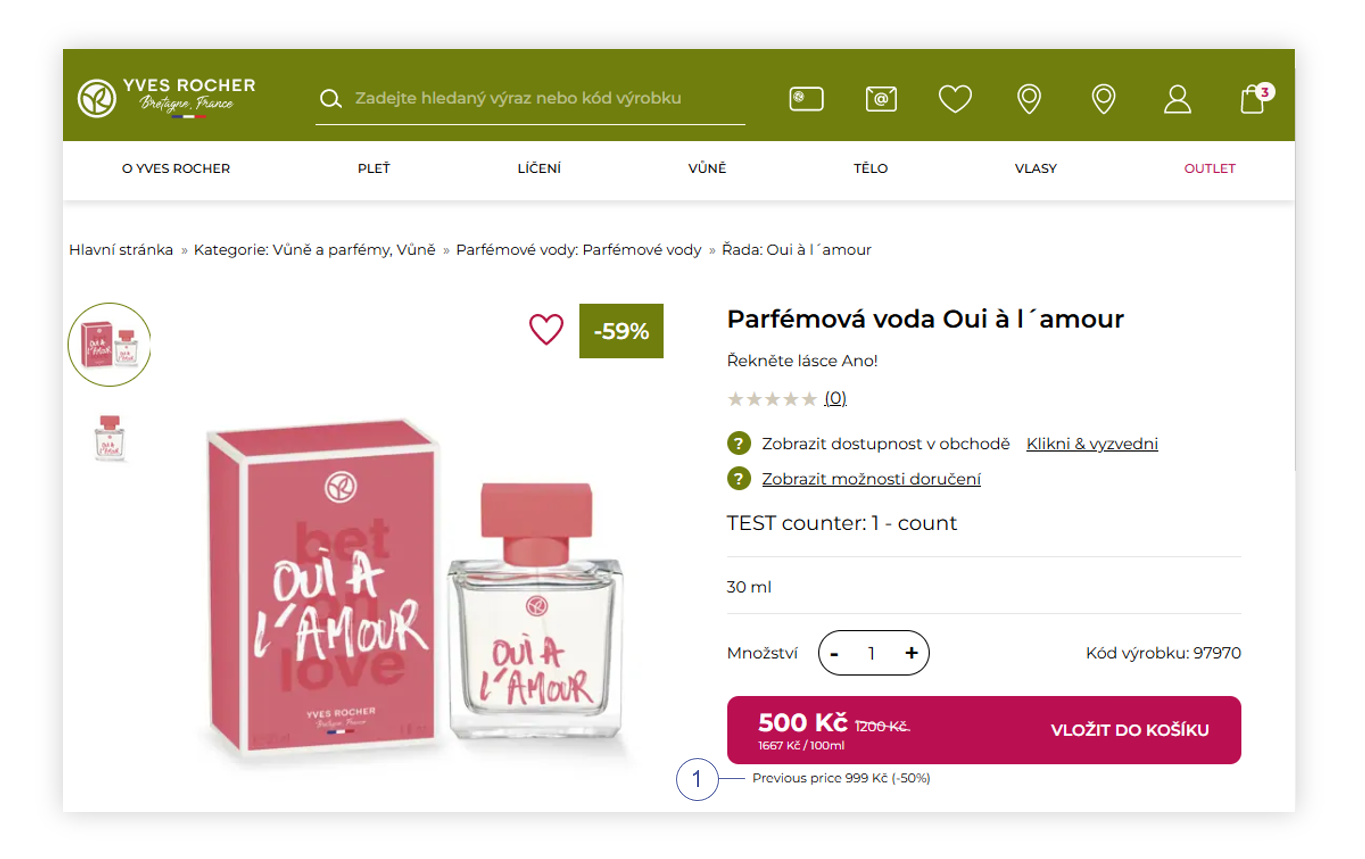
In this article, you can learn about the omnibus price history functionality. This functionality allows showing the customers if the current product catalog price is the lowest catalog price in the last X days or not **<span style="color: #4054a0;">(1)</span>** when the promotion price is applied to the product. If the price is not the lowest one, there will be information about the lowest price in the last X days. The price check occurs every day at 01:05, 09:05, 16:05, and 23:30. This functionality also introduces a new price history report.

<table id="bkmrk-visualization-of-the" style="margin-right: auto; margin-left: auto; height: 44px; width: 692px;"><tbody><tr style="height: 22px;"><td class="wysiwyg-text-align-center" style="text-align: center; vertical-align: middle; height: 22px; width: 680.167px;">![POWERPNT_ZE57iSEqFU.png](https://knowledge.tauceti-digital.com/uploads/images/gallery/2024-11/7473573038236.png)</td></tr><tr style="height: 22px;"><td class="wysiwyg-text-align-center" style="text-align: center; vertical-align: middle; height: 22px; width: 680.167px;"><span class="wysiwyg-font-size-medium">*Visualization of the omnibus functionality on a product page (desktop)* </span></td></tr></tbody></table>

<table id="bkmrk-visualization-of-the-1" style="margin-right: auto; margin-left: auto; height: 44px; width: 692px;"><tbody><tr style="height: 22px;"><td class="wysiwyg-text-align-center" style="text-align: center; vertical-align: middle; height: 22px; width: 680.167px;">![POWERPNT_TwTDsZVZgC.png](https://knowledge.tauceti-digital.com/uploads/images/gallery/2024-11/8016725164316.png)</td></tr><tr style="height: 22px;"><td class="wysiwyg-text-align-center" style="text-align: center; vertical-align: middle; height: 22px; width: 680.167px;"><span class="wysiwyg-font-size-medium">*Visualization of the omnibus functionality on a product page (mobile)* </span></td></tr></tbody></table>

Table of contents:

1. [ Configuring the integration](#bkmrk-configuring-the-inte-1)
2. [ Product price history](#bkmrk-product-price-histor)
3. [ Customer perspective](#bkmrk-customer-perspective)

---

# ![Screenshot_2020-04-29_at_19.12.41.png](https://knowledge.tauceti-digital.com/uploads/images/gallery/2024-11/AaCscreenshot-2020-04-29-at-19-12-41-png.png) Configuring the integration

In order to turn on the integration, you have to navigate to:

***System &gt; System / settings &gt; Built-in functions &gt; Omnibus price history***

Below you will find a description of possible actions.

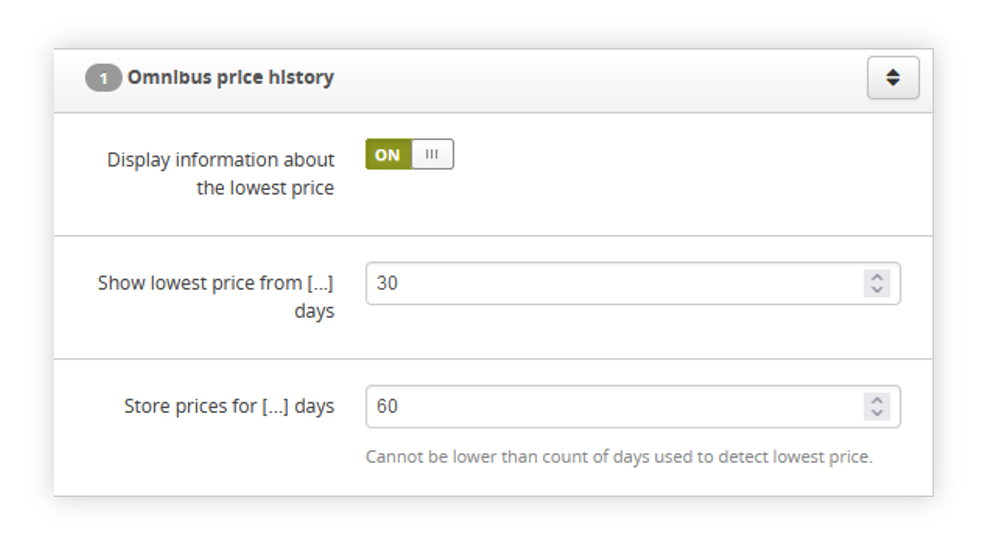
<table id="bkmrk-visualization-of-the-2" style="margin-right: auto; margin-left: auto; height: 47px; width: 692px;"><tbody><tr style="height: 22px;"><td class="wysiwyg-text-align-center" style="text-align: center; vertical-align: middle; height: 25px; width: 680.167px;">![POWERPNT_tKhLupjaRP.png](https://knowledge.tauceti-digital.com/uploads/images/gallery/2024-11/6319166780828.png)</td></tr><tr style="height: 22px;"><td class="wysiwyg-text-align-center" style="text-align: center; vertical-align: middle; height: 22px; width: 680.167px;"><span class="wysiwyg-font-size-medium">*Visualization of the omnibus price history system settings* </span></td></tr></tbody></table>

- <label class="control-label" for="settings_omnibus_display_price_info">**Display information about the lowest price** - An ON / OFF switch that enables the integration on the website.  
    </label>
- <label class="control-label" for="settings_omnibus_price_history_days">**Show lowest price from \[...\] days** - A field where you can define from how many days back the lowest price should be read. The price check occurs every day at 01:05, 09:05, 16:05, and 23:30.  
    </label>
- <label class="control-label" for="settings_omnibus_price_storage_days"><label class="control-label" for="settings_omnibus_price_storage_days">**Store prices for \[...\] days** - A field where you can define for how many days the prices should be stored. Cannot be lower than the count of days used to detect the lowest price. Stored prices are used in the product's price history report. You can read more about this report in the [ Product price history](#bkmrk-product-price-histor) chapter.  
    </label></label>

---

# ![Screenshot_2020-04-29_at_19.12.41.png](https://knowledge.tauceti-digital.com/uploads/images/gallery/2024-11/AaCscreenshot-2020-04-29-at-19-12-41-png.png) Product price history

With this integration, a new report has been created. The product price history report can be found in:

***Reports &gt; Products price history***

<span class="wysiwyg-color-black" style="color: #44549b;">![info2.svg](https://knowledge.tauceti-digital.com/uploads/images/gallery/2024-11/88Tinfo2-svg.png) **Remember**</span><span class="wysiwyg-color-black" style="display: block; margin-top: 10px;">Prices are updated four times per day. The report contains prices for every product which was active in the default altshop on a given day. If a product was not active in the default alt shop, there will be no row for a given product and day. Only default altshop prices are used. Prices history is stored for X days (configurable in the system settings). You can learn more about altshops in the [Alt shops - Introduction](https://tauceti.zendesk.com/hc/en-us/articles/360017301600) article.  
The SKU column in the report is just to allow for faster data analysis. Data is stored per product, not per SKU, as all SKUs assigned to a single product always have the same price.  
</span>

Below you will find a description of possible actions.

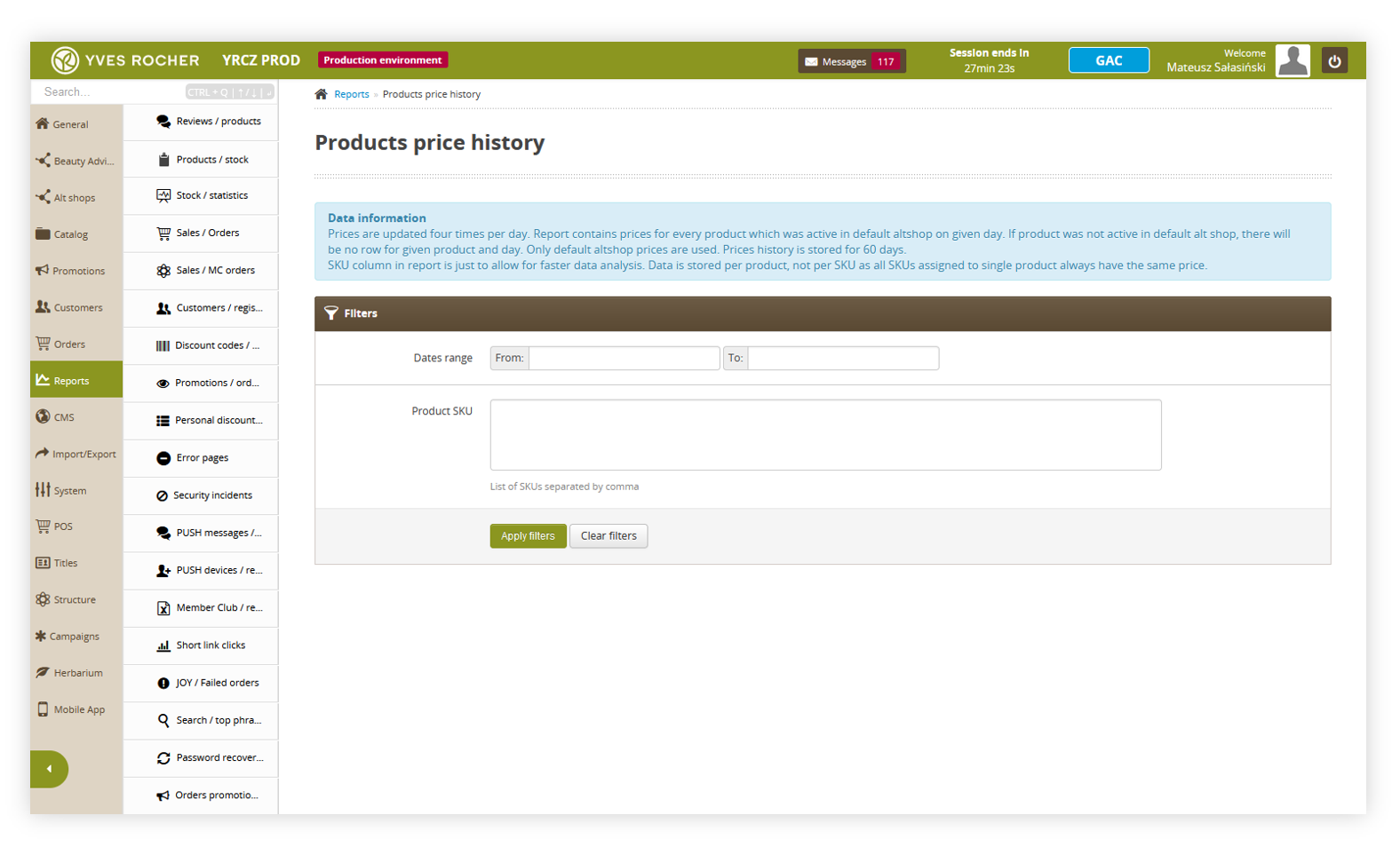
<table id="bkmrk-visualization-of-the-3" style="margin-right: auto; margin-left: auto; height: 44px; width: 705px;"><tbody><tr style="height: 22px;"><td class="wysiwyg-text-align-center" style="text-align: center; vertical-align: middle; height: 22px; width: 693.167px;">![POWERPNT_JbdcWypvUR.png](https://knowledge.tauceti-digital.com/uploads/images/gallery/2024-11/6319166595996.png)</td></tr><tr style="height: 22px;"><td class="wysiwyg-text-align-center" style="text-align: center; vertical-align: middle; height: 22px; width: 693.167px;"><span class="wysiwyg-font-size-medium">*Visualization of the products price history* </span></td></tr></tbody></table>

- **Date range** - A range of dates from which price history will be exported.
- **Product SKU** - A list of SKUs separated by commas that will be exported.

You can export the report with an **Apply filters** button. It is possible to export the report without any filters applied, then all available SKUs will be generated in the report with a date range between the first time the integration was enabled and the current time.

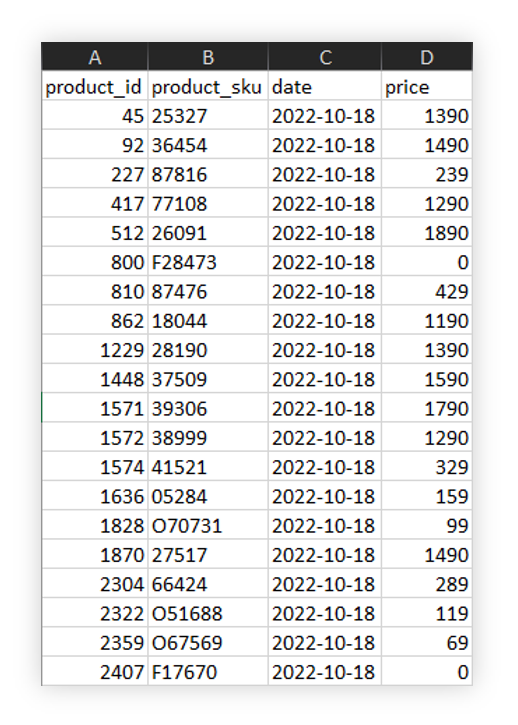
Below, you will see all available columns in the exported XLSX file.

<table id="bkmrk-visualization-of-the-4" style="margin-right: auto; margin-left: auto; height: 44px; width: 692px;"><tbody><tr style="height: 22px;"><td class="wysiwyg-text-align-center" style="text-align: center; vertical-align: middle; height: 22px; width: 680.167px;">![POWERPNT_NXJfMUuwk6.png](https://knowledge.tauceti-digital.com/uploads/images/gallery/2024-11/6319166683548.png)</td></tr><tr style="height: 22px;"><td class="wysiwyg-text-align-center" style="text-align: center; vertical-align: middle; height: 22px; width: 680.167px;"><span class="wysiwyg-font-size-medium">*Visualization of the products price history xlx file* </span></td></tr></tbody></table>

- **Product\_id** - An internal ID of a product
- **Product\_sku** - Products SKU.
- **Date** - A date where a price was registered
- **Price** - A registered price for a selected day.

---

# ![Screenshot_2020-04-29_at_19.12.41.png](https://knowledge.tauceti-digital.com/uploads/images/gallery/2024-11/AaCscreenshot-2020-04-29-at-19-12-41-png.png) Customer perspective

With the functionality turned on, customers will see in every place on the website where products are visible (for example product catalog, promotion pages, in the cart) information if the current catalog price is the lowest one with a percentage of how much bigger / smaller it is to the current price **<span style="color: #4054a0;">(1)</span>**.

This information is only visible when a selected product has applied a promotional price. Products without a promotional price will not have visible omnibus functionality.

Below you will see examples of the functionality on the website

<table id="bkmrk-visualization-of-the-5" style="margin-right: auto; margin-left: auto; height: 44px; width: 692px;"><tbody><tr style="height: 22px;"><td class="wysiwyg-text-align-center" style="text-align: center; vertical-align: middle; height: 22px; width: 680.167px;">![POWERPNT_ZE57iSEqFU.png](https://knowledge.tauceti-digital.com/uploads/images/gallery/2024-11/7473573038236.png)</td></tr><tr style="height: 22px;"><td class="wysiwyg-text-align-center" style="text-align: center; vertical-align: middle; height: 22px; width: 680.167px;"><span class="wysiwyg-font-size-medium">*Visualization of the omnibus functionality when current catalog price is higher than previous one* </span></td></tr></tbody></table>

<table id="bkmrk-visualization-of-the-6" style="margin-right: auto; margin-left: auto; height: 44px; width: 692px;"><tbody><tr style="height: 22px;"><td class="wysiwyg-text-align-center" style="text-align: center; vertical-align: middle; height: 22px; width: 680.167px;">![POWERPNT_WeM5WgwNc6.png](https://knowledge.tauceti-digital.com/uploads/images/gallery/2024-11/7473510961308.png)</td></tr><tr style="height: 22px;"><td class="wysiwyg-text-align-center" style="text-align: center; vertical-align: middle; height: 22px; width: 680.167px;"><span class="wysiwyg-font-size-medium">*Visualization of the omnibus functionality when current catalog price is lower than previous one*</span></td></tr></tbody></table>

<table id="bkmrk-visualization-of-the-7" style="margin-right: auto; margin-left: auto; height: 44px; width: 692px;"><tbody><tr style="height: 22px;"><td class="wysiwyg-text-align-center" style="text-align: center; vertical-align: middle; height: 22px; width: 680.167px;">![POWERPNT_hKJtW8bJA3.png](https://knowledge.tauceti-digital.com/uploads/images/gallery/2024-11/7473510976796.png)</td></tr><tr style="height: 22px;"><td class="wysiwyg-text-align-center" style="text-align: center; vertical-align: middle; height: 22px; width: 680.167px;"><span class="wysiwyg-font-size-medium">*Visualization of the products in the product catalog (desktop* </span></td></tr></tbody></table>

<table id="bkmrk-visualization-of-the-8" style="margin-right: auto; margin-left: auto; height: 44px; width: 692px;"><tbody><tr style="height: 22px;"><td class="wysiwyg-text-align-center" style="text-align: center; vertical-align: middle; height: 22px; width: 680.167px;">![POWERPNT_eAPSbvYDpR.png](https://knowledge.tauceti-digital.com/uploads/images/gallery/2024-11/8016741381532.png)</td></tr><tr style="height: 22px;"><td class="wysiwyg-text-align-center" style="text-align: center; vertical-align: middle; height: 22px; width: 680.167px;"><span class="wysiwyg-font-size-medium">*Visualization of the products in the product catalog (mobile)* </span></td></tr></tbody></table>